KAYRA Connect

KAYRA Connect

The employee operations and communication platform for field teams

KAYRA Connect is a multi-tenant employee operations and communication platform built for companies with drivers, depot staff and field teams: logistics, distribution, cleaning, field service. One codebase serves two experiences — a mobile app installed on the employee's phone and a control panel management uses on the desktop.

The logic is simple. An employee scans the QR code on the wall in the morning; from that moment the day lives in the system: the planned shift, the hours worked, the reason for an early finish, the vehicle used, the document uploaded, the support request sent. Management sees the same events live, approves them against rules, and takes the report at the end of the period. Every module below is running in production today.
Live application · opens in a new tab
Next.js 16React 19TypeScriptSupabasePostgreSQL 17 / RLSTailwind CSS v4next-intlPWAVercel
KAYRA Connect

Module 1 — QR attendance and working time

Attendance starts with the one thing an employee already knows how to do: point a camera at a code.

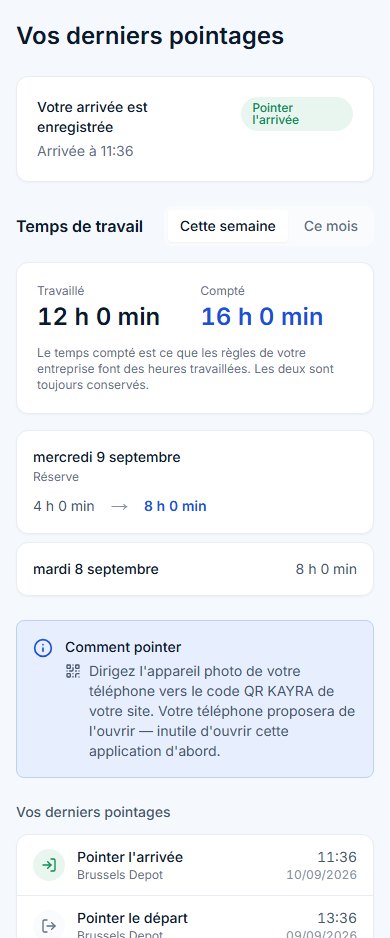
  • Without opening the app. The QR code encodes a link carrying an opaque token. The employee points their phone's own camera at the sheet in the depot and lands straight on the result screen. Scanning from inside the app works too.
  • Arrival or departure — the server decides. It looks at the employee's own state; a rescan within 90 seconds counts as the same scan, and a shift left open overnight is not closed — a new day is started.
  • The company's clock, not the server's. Every time on every screen is in the company's own time zone; "today" is the company's today.
  • Worked and counted, side by side. Scans are paired into days once; every working-time screen reads the same source. On the phone the employee sees, for this week and this month, the time "worked" and the time "counted" that the company's rules make of it.
  • A wrong day can be corrected — on the record. The employee reports a faulty day, the authorised department enters the correction; it moves the day's boundary and is written to the audit log.
  • Report, CSV and a printed sheet. A per-employee report over a chosen period; a CSV Excel opens intact and an attendance sheet printed straight from the page.
Module 1 — QR attendance and working time — KAYRA Connect

Module 2 — Early finishes and company rules

A shift ending early is not hidden in the system — it is asked about at that moment and counted honestly.

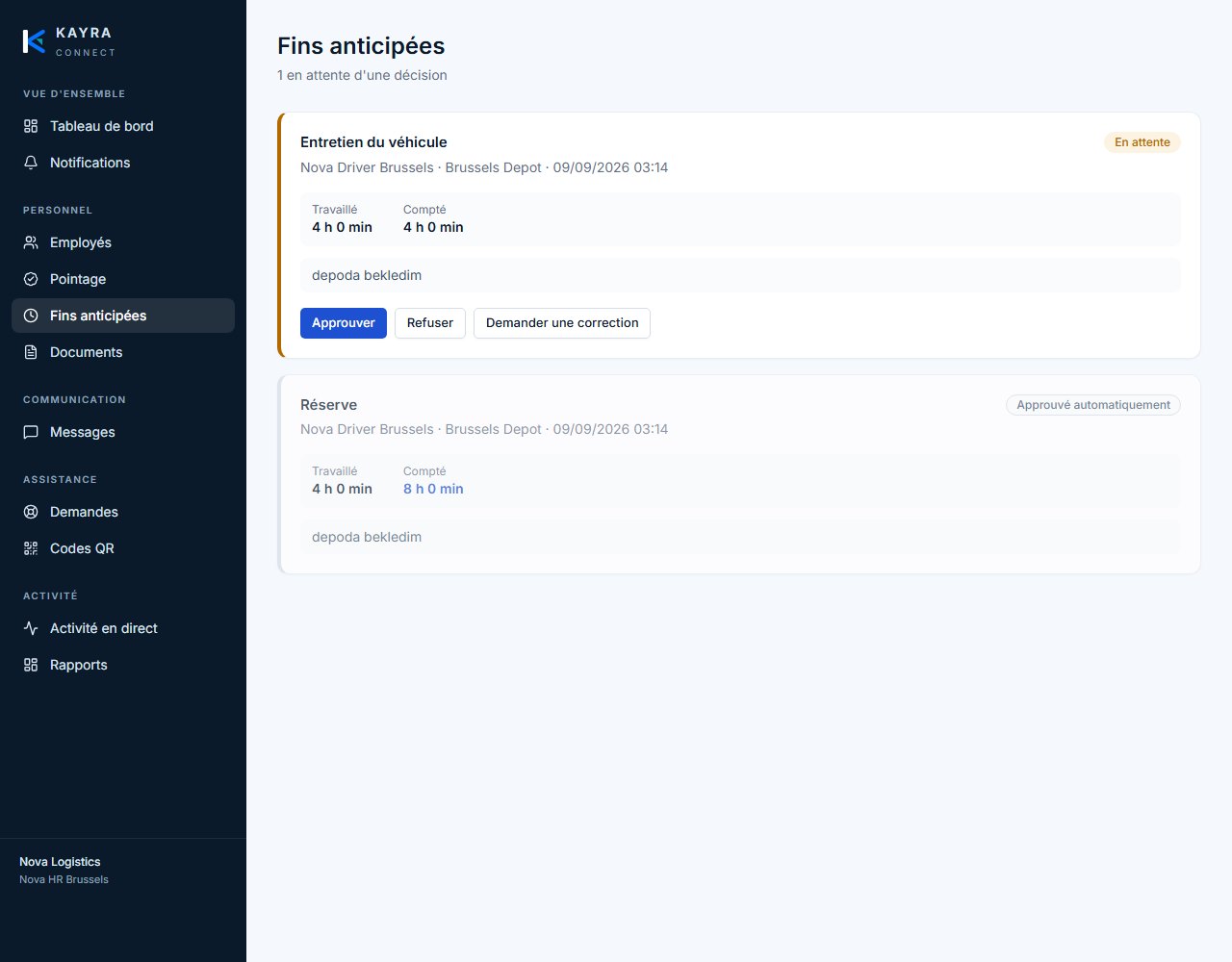
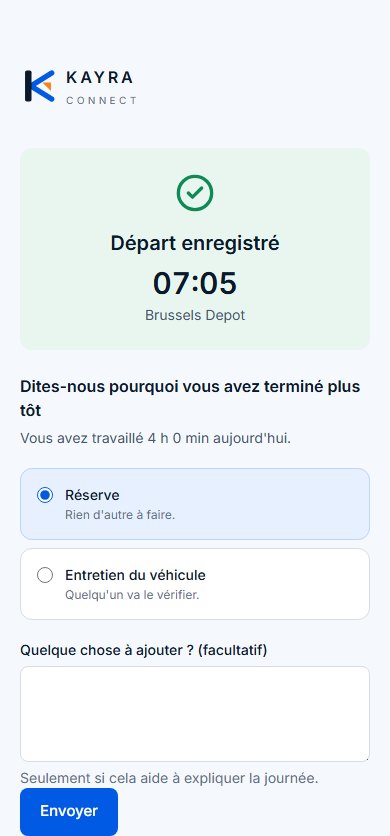
  • The reason, at the moment of leaving. When an employee scans out early, the app asks why: a backup day, vehicle maintenance, whatever other reasons the company has defined. An optional note can be added.
  • Approve, refuse or send back. Management sees pending early finishes in one list; each record carries hours worked and hours counted side by side.
  • The company sets the rules. Which reason is approved automatically, which counts as a full day, which waits for a decision — all from the panel, with no code change.
  • It goes to the right person. An early finish for vehicle maintenance lands with whoever owns the fleet and is attached to the vehicle concerned.
Module 2 — Early finishes and company rules — KAYRA Connect

Module 3 — Planning

Without a plan, "started late" and "available" cannot be said. KAYRA writes the plan down and measures the day against it.

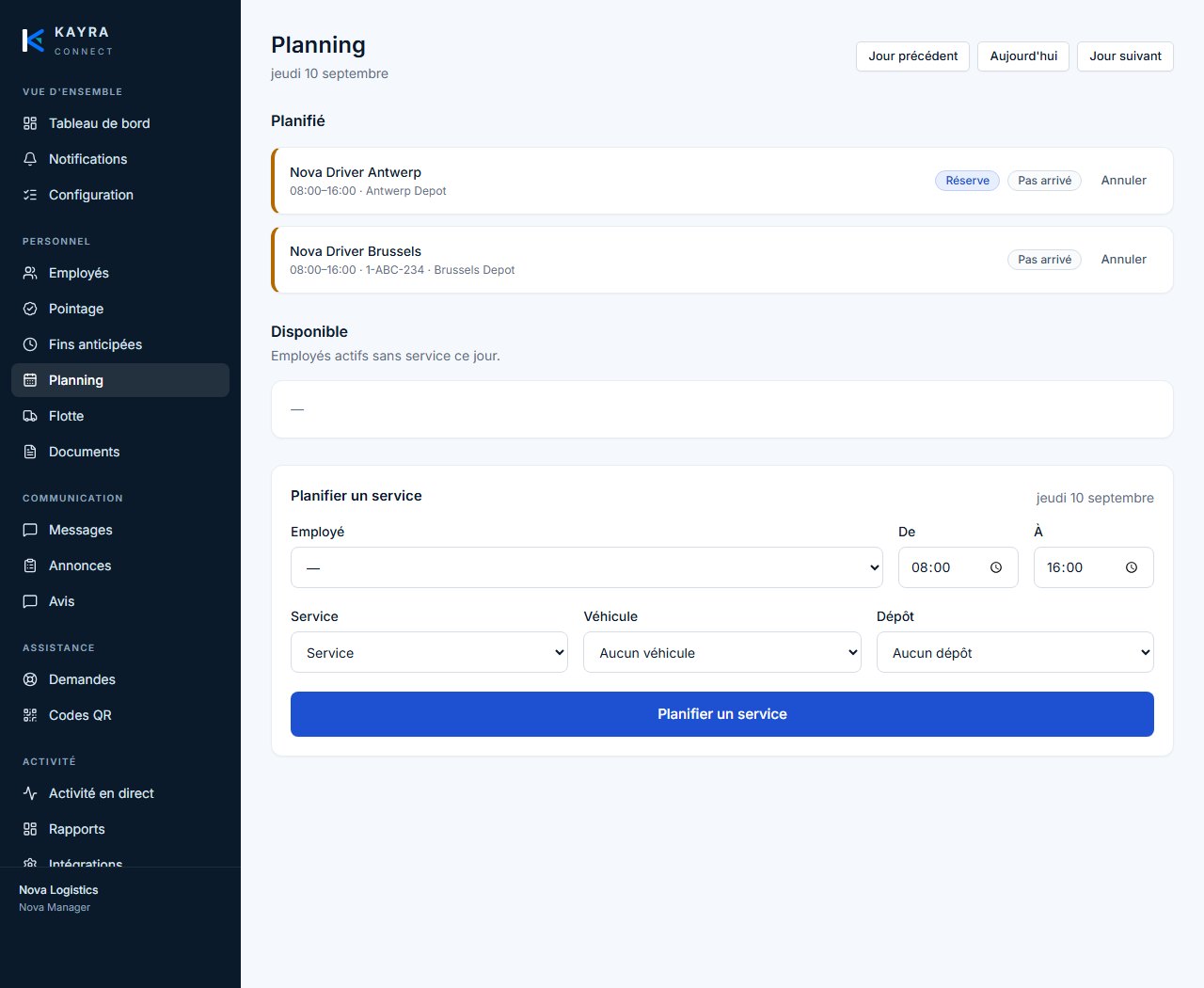
  • A service per day. Employee, time range, service type, vehicle and depot. A backup shift is its own kind of shift, not a checkbox; the company can add its own kinds.
  • Six questions answered. Who is working, who is backup, who is available, who finished early, why, and which vehicle is affected — on one screen.
  • Planned against actual. Attendance is read against the plan; a late start is now a fact that can be stated.
  • The driver knows about tomorrow. The first screen of the employee app shows the next shift, its hours and the assigned vehicle.
Module 3 — Planning — KAYRA Connect

Module 4 — Fleet and vehicle documents

Vehicles are tied to what staff report: when an employee says "vehicle maintenance", it is written into a vehicle's history.

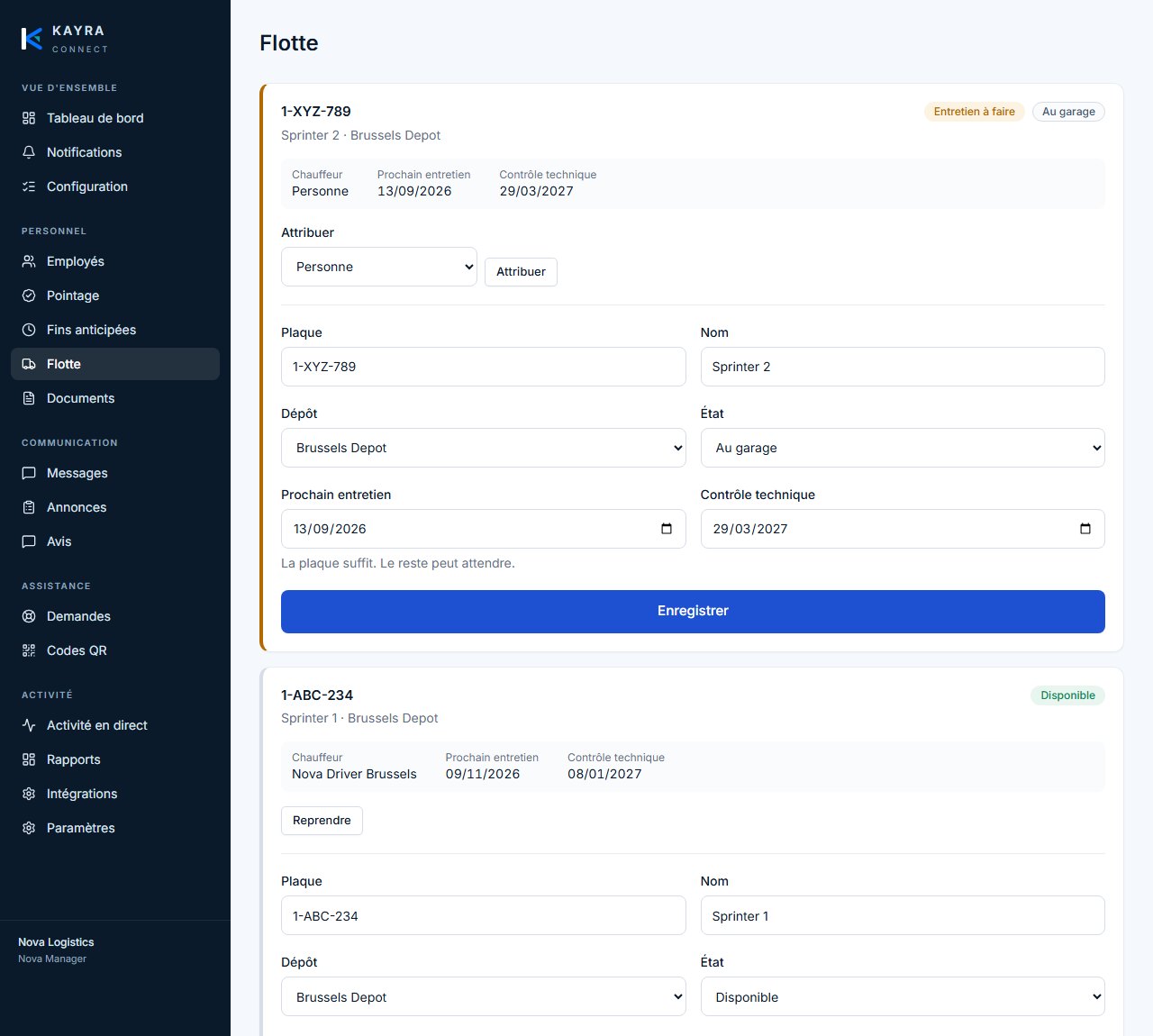
  • Vehicle list. Plate, name, depot, status (available, at the garage, service due), assigned driver, next service and inspection date.
  • One driver, one vehicle. Assignment boundaries are enforced in the database; two vehicles cannot be written to one person at the same time.
  • Documents and expiry. Insurance, inspection and other vehicle papers sit in private storage; the expiry date is read from the fleet screen.
  • Service events arrive on their own. Vehicle-related events generated by employees appear in the vehicle's history automatically.
Module 4 — Fleet and vehicle documents — KAYRA Connect

Module 5 — The employee app

Installed to the phone's home screen, working in five languages, and not losing a request even in a depot with no signal.

  • A support request in three taps. Group, problem, send. The priority comes from the category; the employee never chooses it. Emergency skips the group step.
  • Documents. Uploads what HR has asked for as a photo or PDF, sees the review outcome. Files sit in private storage behind short-lived signed links.
  • Messages and announcements. One thread with management; on the home screen, only the unread announcements.
  • Feedback. Anonymous where the company allows it — and anonymous means no author is stored, not a hidden one.
  • When the connection drops. A phone that knows it has no signal holds the request, says so before the tap, and sends it once when the signal returns; the server never processes the same request twice.
  • Five languages. French, Dutch, English, Turkish and Ukrainian; chosen on first launch and tied to the person.
Module 5 — The employee app — KAYRA Connect

Module 6 — The management panel

A control panel designed for the desktop that becomes a drawer on smaller screens.

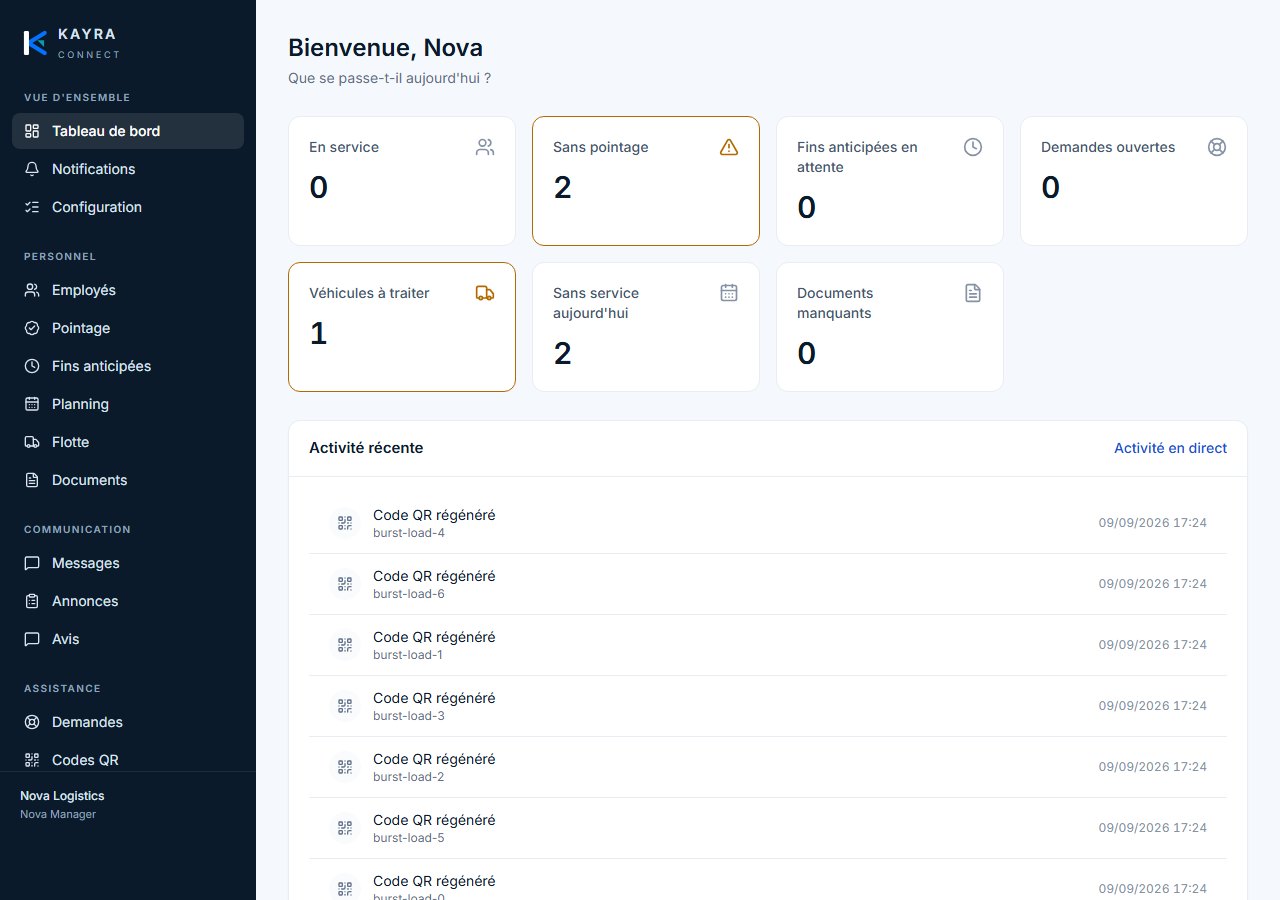
  • Dashboard. Who is on duty, who has not clocked in, pending early finishes, open requests, vehicles needing attention, missing documents — live counts.
  • Support queue. Urgency first, age second; status transitions and priority lights.
  • Live activity centre. One websocket, no polling. Filter by employee, site, department, event type, priority and date; search across the translated names of events — a reader working in Turkish who types "Belge" finds a document upload.
  • Reports. Attendance, support, documents and feedback; every figure aggregated in Postgres, not counted in the browser. CSV and PDF export is gated on permission.
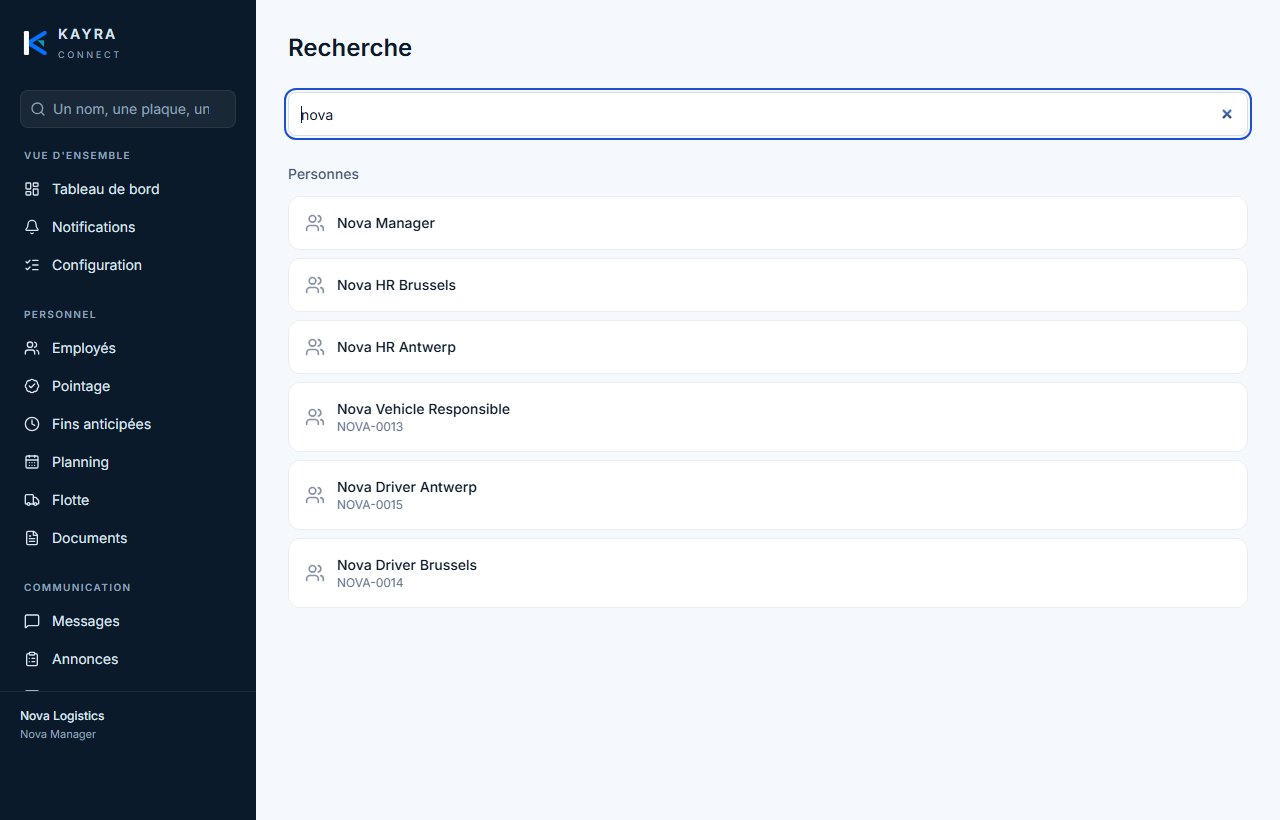
  • One search box. A name, a plate, a reference, a filename. Results respect permissions and tenant — a user cannot find what they may not see.
  • Company setup and health check. An eleven-step checklist whose ticks come from what the company actually has, not from someone clicking Next. The readiness check catches setups that quietly do nothing: a department with nobody to receive requests, an escalation window with no backup.
  • Escalation. A category carries a window; if the primary responsible has not acknowledged in time, the backup is notified once and it is written to the audit log.
  • Company settings. Name, logo, brand colours, sites, departments, language and working rules — without a code change.
Module 6 — The management panel — KAYRA Connect

Multi-tenant platform administration

  • A separate route, a separate permission. A platform administrator carries no blanket access to any company's data.
  • Companies. Create, rename, suspend; plan and seat limit — the limit is enforced in the database, so the next invitation is refused.
  • Modules. A platform default and a per-company override; a switched-off module disappears from menus, pages and RLS in one move.
  • Platform audit log. Platform-level events only; nothing from inside a company can reach this screen.

Security and infrastructure

  • Row Level Security and composite foreign keys. A company reads only its own data; a cross-tenant reference cannot be written at all.
  • A tenant id sent by the client is never trusted. The tenant is derived server-side from the session.
  • A configurable permission layer. Person override, then company role default, then denied. Branch scope defaults to narrow: HR sees only the depots they are granted.
  • Audit log. Written by triggers and the server side only; never by a client.
  • Branding is runtime data. Two colours drive the whole palette; one build renders every customer under their own brand.
  • Hosted in Europe. Supabase Postgres 17, Frankfurt.

Getting started

  1. Scope. We start from your sites, departments, working rules and early-finish reasons — counted hours are built on them.
  2. Company setup. Logo, brand colours, the languages offered; the eleven-step checklist is completed and the readiness check passed.
  3. Employees. Invitations are sent, roles and branch scopes are defined.
  4. Pilot depot. QR sheets are printed, one depot runs real attendance for a week; the first working-time report is read together.
  5. Rollout. Planning and fleet go live, the remaining sites are added; we stay on support through the first weeks.

Could this run at your company?

Describe your operation in two lines. You get a costed scope back, not a brochure.

Or call us directly +32 460 25 64 64
WhatsApp · Reply within 4 h